Twitch Has Finally Released A Streaming Solution For PC Gamers
Viswamitra Jayavant - Sep 13, 2019
PC streamers have had quite a rough time considering Twitch doesn't officially support streaming from PC. Well, not anymore with Twitch Studio.
- Are Autoplay-Styled Games The Future Of Gaming?
- Female Streamers Banned After Flaunting Their Bodies And Saying Offensive Things
- Call Of Duty, Modern Warfare: Hackney Yard Decoding
Up until now, all of the streamers who try to stream their gameplay or leave commentary of their play-through on Twitch have to rely on consoles (PS4 and Xbox One), Twitch’s official app on mobile or a third-party app.
As you can see, in spite of the fact that most streamers produce contents on PC, there is no straight-forward way of doing it. Good news for all of those who think they can build a name or career out of Twitch, as of today, you can now use Twitch Studio to stream your PC plays directly to your audience.
Twitch Studio
Twitch Studio is the first attempt of the company of bringing the service to PC. The software is currently in closed beta, but there’s an application process for all of those who want to have a taste of the program first-hand. Of course, the main goal of the program is to aid streamers in their content production on PC. Everything is rather simple and convenient on the PS4 and Xbox One, but only until now that PC gets the same treatment.
What about all of those who had been rather used to third parties streaming programs like OBS and Streamlabs OBS?

Well, if they are satisfied with their current streaming set-up, this new addition probably won’t do them any good so they can keep it as they see fit. Novice streamers may found this immensely useful in getting started, though. But in the case that big streamers want to go and try it out, Twitch said that they’re completely welcomed to do that.
Twitch Studio allows you to start streaming very quickly, so you don’t have to go through a complicated set-up process when you just want to stream yourself making awesome plays on Fortnite or showing off your new strategies on Auto-Chess. From what I’ve seen, the set-up process seems quite effortless like setting up for a messaging service: Tune in your microphone and your camera or webcam, then pick up an appearance package to give a flair to your stream.
And voila, you’re up and running.
Long Term Road Map
Twitch Studio is currently quite limited in term of features in comparison to the third party, but the company’s road map for it is quite expansive in the future. From capture cards, in-game overlays to help with quick messaging between the streamers and the audience, e.t.c. soon enough it might just have not only a rich set of features but also deep enough integration with Twitch itself to make it the default streaming program on the platform.
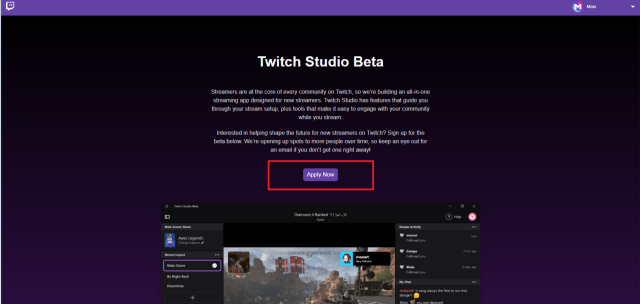
Currently, the program includes an activity feed, alerts, and a messaging function that allows you to chat directly with the audience.
Featured Stories

Features - Mar 24, 2026
How to Use GeForce NOW to Play Video Games Without Actual Hardware

Features - Jan 29, 2026
Permanently Deleting Your Instagram Account: A Complete Step-by-Step Tutorial

Features - Jul 01, 2025
What Are The Fastest Passenger Vehicles Ever Created?

Features - Jun 25, 2025
Japan Hydrogen Breakthrough: Scientists Crack the Clean Energy Code with...

ICT News - Jun 25, 2025
AI Intimidation Tactics: CEOs Turn Flawed Technology Into Employee Fear Machine

Review - Jun 25, 2025
Windows 11 Problems: Is Microsoft's "Best" OS Actually Getting Worse?

Features - Jun 22, 2025
Telegram Founder Pavel Durov Plans to Split $14 Billion Fortune Among 106 Children

ICT News - Jun 22, 2025
Neuralink Telepathy Chip Enables Quadriplegic Rob Greiner to Control Games with...

Features - Jun 21, 2025
This Over $100 Bottle Has Nothing But Fresh Air Inside

Features - Jun 18, 2025
Comments
Sort by Newest | Popular