Top 10 New Features From Instagram That You Should Check Out (Part 2)
Harin - Aug 29, 2019

If you want to boost up your campaign, bolster your interaction with followers or enhance your user experience, check out these top 10 Instagram features.
- Permanently Deleting Your Instagram Account: A Complete Step-by-Step Tutorial
- Instagram Launches A Lite Version For Users In Rural And Remote Areas
- How To Export Your Old Messages From Social Media
If you want to be famous online, be trending on Instagram should do the trick. From popular brands to famous celebrities and fun-love people, Instagram is the most popular choice to win attention. Ensuring high engagement as well as impressive impact, the photo and video sharing platform is the perfect place for marketing. With stiff competition from both Snapchat and TikTok, the Facebook-owned app needs to come out with new features to stay ahead of the game. To keep users engrossed, adding in new features has a vital role.
If you want to boost up your campaign, bolster your interaction with followers or enhance your user experience, take a look at these top 10 new features from Instagram.
6. Nametag
Nametag is one of Instagram’s most appreciable recently arrived features. The feature allows you nametag creation and customization. Moreover, you can also find and follow new accounts by scanning others’ nametag. You can start by opening the Instagram app, select the profile tap. On the menu button, tap on Nametag.
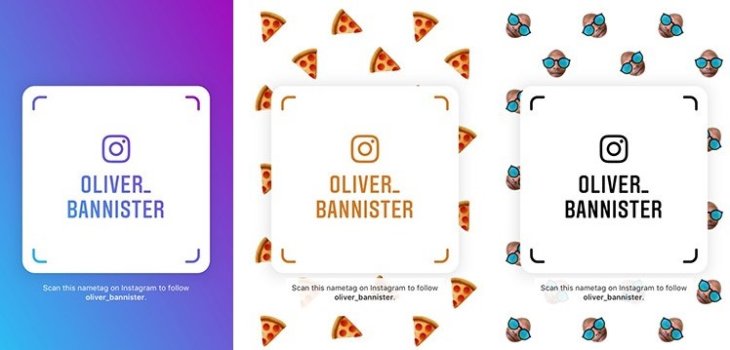
For nametag customization, you can just tap anywhere or hit the top center button to select from different designs such as color, emoji, selfie, and many more. After you are done creating, there is a share button located at the top right that you can tap on. From then, you can select the method with which you can share with your friends.
To scan a name tag, you can tap on it, point the camera of your device on the tag. And that’s it.
7. Activity Tracking
If you think you overuse Instagram and want to track the amount of time you spend on the app, you can use a built-in feature called Activity Tracking.
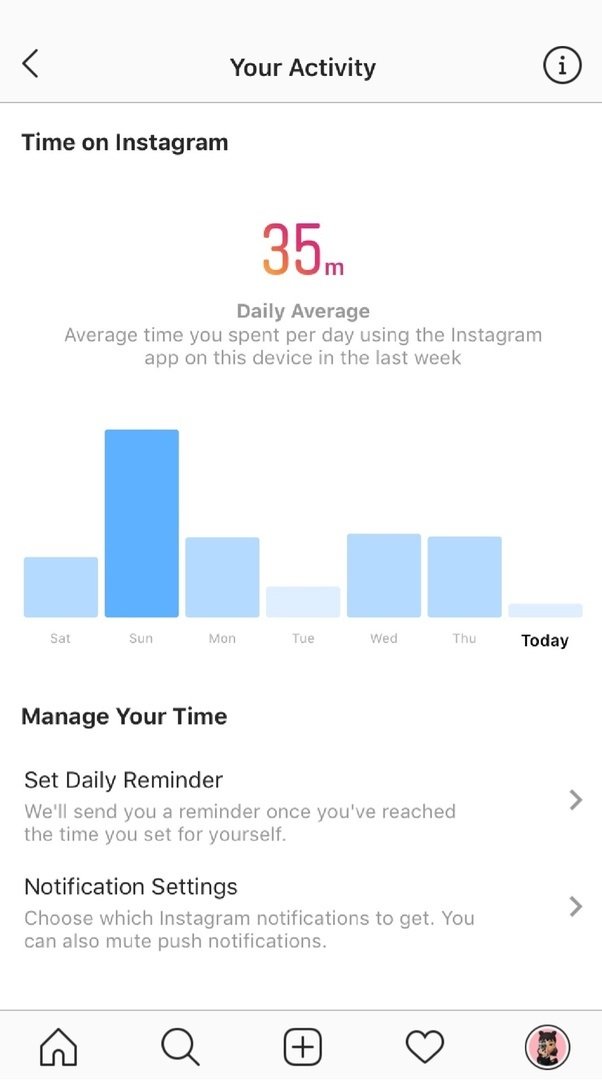
With this feature, you can know how much time you spend on Instagram on average. You can also set a reminder with which the app can send you an alert whenever you have reached the limit. This can come in handy for those who want to deal with app addiction or want to cut down unnecessary usage.
All you need to do is open Instagram, then select the profile button. At the top right, there is a menu button, tap on this. There, you can select Your Activity. This is where you can see the amount of time you spent on Instagram the previous week.
8. Reduce Cellular Data Usage for Android Users Only
This one is helpful for those whose cellular data often runs out before the deadline. This feature helps prevent your cellular data from being eaten up by high-resolution data by restricting hi-res media download only on Wi-Fi. However, keep in mind that only Android users can use this feature.
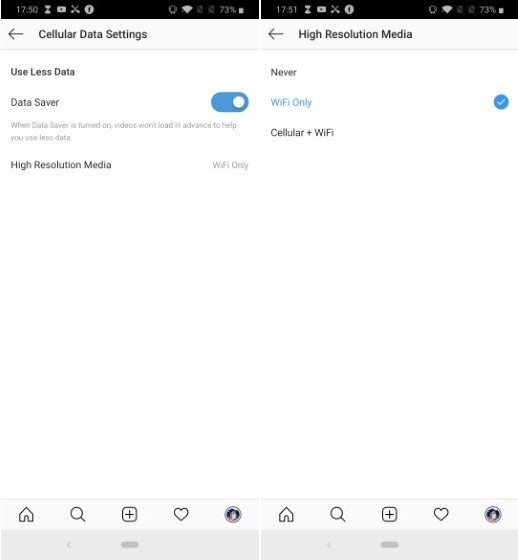
First, open the Instagram app on your device. From there, tap on the profile icon, then tap the menu button. Go to Settings. Select Account, then Cellular Data Use. Make sure that the Data Saver switch is ON. Next, select High-Resolution Media. There, you can choose between “Never” or “Wi-Fi only.”
9. Manage Posts on Multiple Accounts
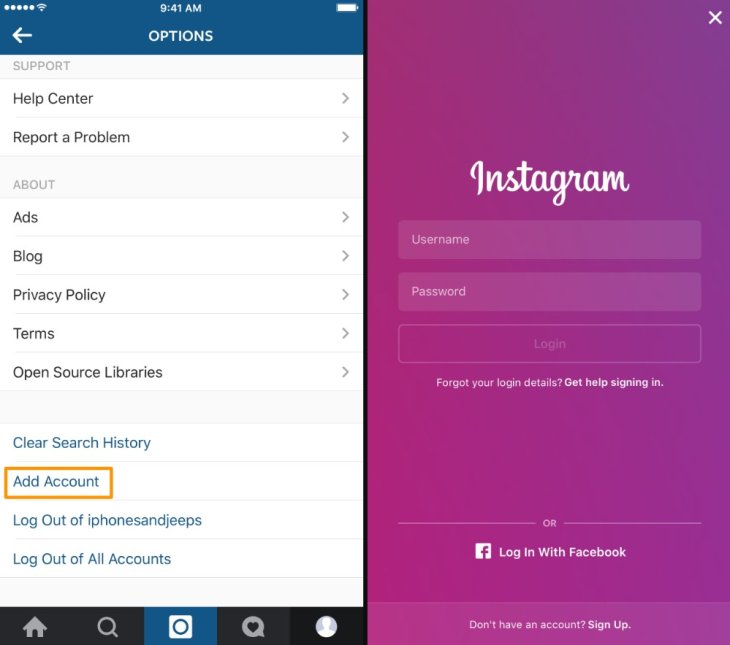
If you have several Instagram accounts, then this is what you need. With this feature, your post can be shared on your different accounts simultaneously. On the page where you can select the medium with which you want to share your post, either on Facebook, Tumblr, or Twitter, there’s an option which you can turn on to share your post to other accounts.
10. Create The Instagram Stories Filter Of Your Own
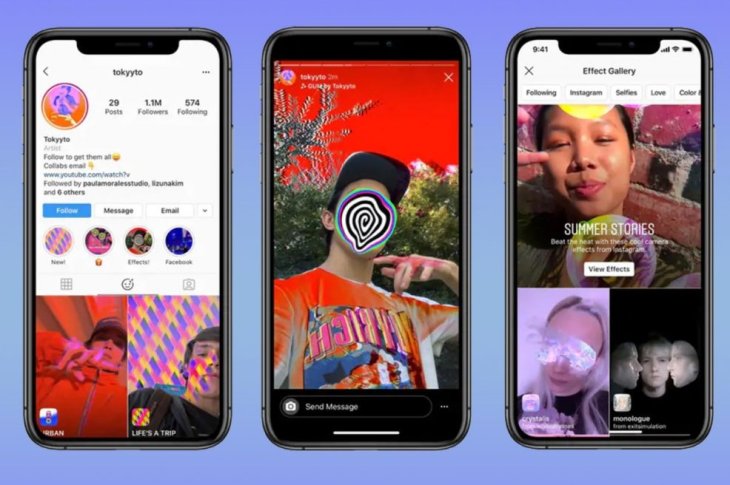
Instagram’s collection of attractive filters might not satisfy everyone. If you are one of those people, this might be good news.
At the recent F8 conference, Facebook made an announcement that everyone would soon be able to create their unique Instagram stories. To do this, you have to use Spark AR Studio, new software which is used to make unique filters.
Featured Stories

Features - Mar 24, 2026
How to Use GeForce NOW to Play Video Games Without Actual Hardware

Features - Jan 29, 2026
Permanently Deleting Your Instagram Account: A Complete Step-by-Step Tutorial

Features - Jul 01, 2025
What Are The Fastest Passenger Vehicles Ever Created?

Features - Jun 25, 2025
Japan Hydrogen Breakthrough: Scientists Crack the Clean Energy Code with...

ICT News - Jun 25, 2025
AI Intimidation Tactics: CEOs Turn Flawed Technology Into Employee Fear Machine

Review - Jun 25, 2025
Windows 11 Problems: Is Microsoft's "Best" OS Actually Getting Worse?

Features - Jun 22, 2025
Telegram Founder Pavel Durov Plans to Split $14 Billion Fortune Among 106 Children

ICT News - Jun 22, 2025
Neuralink Telepathy Chip Enables Quadriplegic Rob Greiner to Control Games with...

Features - Jun 21, 2025
This Over $100 Bottle Has Nothing But Fresh Air Inside

Features - Jun 18, 2025
Best Mobile VPN Apps for Gaming 2025: Complete Guide
Read more

Mobile- May 11, 2026
Sony Sets Xperia 1 VIII Reveal for May 13
With the official event just days away, anticipation is building for what could be one of Sony's most ambitious Xperia updates in years.
Comments
Sort by Newest | Popular